There are several possible reasons the platter on your Fluance turntable might not be spinning.
- The speed has not been selected - Turn the speed selector to 33 or 45 to engage the motor.
- The belt is installed incorrectly or has fallen off the platter or motor pulley.
- Inspect the belt for signs of wear, or dust and debris.
- Auto-Stop is turned on - If Auto-Stop is enabled, the platter will remain stationary until the tonearm is moved over the platter with a speed selected.
- Using the incorrect power adapter - Check the label on the power adapter connected to the turntable to confirm the output voltage is 12V / 500mA.
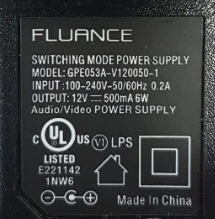
- If the OUTPUT doesn't match the above image, please find the correct adapter and connect it to the turntable. If you cannot find the adapter that was included with the turntable, contact our Customer Experience Team, we will be more than happy to help you order a replacement.
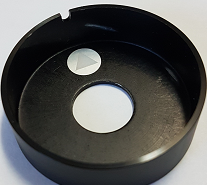
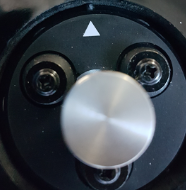
- On Reference Series (RT82, RT83, RT84, RT85) the motor cap may not be on correctly and could rub on the motor pulley. This can either result in a scraping sound, or stop the motor from spinning.
- Ensure the notch on the motor cap is aligned with the arrow in the motor cut-out as shown below: You may need to push the cap into place.